Monthly handover
March 2026
I am drained of all energy. So dont expect much
Contents
1. Internet
2. Doorbell
3. Utility Panels
4. Peloton
5. Stabilisers
6. Alert Predictor
7. Pi Fleet admin
8. Pager
9. Room Temps
10. Kodi / Jellyfin
11. Radar
12. Nav Alarms / Depth Sounder
13. GPS - Gyro heading sensor
14. Entertainments
15. Lighting
16. Batteries
17. AIS
18. Flow
19. CCTV
20. Network
21. Water Heater
22. Funnel Stuff
23. Pool stuff
24. Galley Fan
25. Bilge alert page
26. PI Fleet addon
Chapter 1
Internet
We have now only 2 starlink terminals, forward funnel and aft funnel. Both are high performance marine type. The aft funnel is now mounted on a pedestal like the forward one. Aft is the expensive one, as in the one that we are paying full roaming subscription with motion at sea. The fwd funnel is the standard roaming without motion at sea.
The subscription for starlink changes all the time. Now we buy blocks of data at 500gb each. So we can choose what we want month by month rather than plump for 5TB and lose what we dont use. However we don't use much less than that. The trick is though that if you go for something like 3TB and you use it all up you are then stuck with paying the top up fee which costs way more. So you kinda need to make sure you have enough.
Heres's where it gets squirly. The fwd funnel roaming package is 'roam unlimited' which cost's 89 bucks a month. Its not as high priority as 'global priority' on the aft funnel, but its plenty good enough. So it makes sense to use it as much as we can.
The problem here is knowing when to use it. Clearly when not moving is the when. So the pi55 unit will monitor what we are doing and do the wanmeister swap accordingly, as long as its set to auto, which is is. Basically, instead of using the wanmeister GUI at 192.168.50.2/mgss the pi55 does the same job, but only with a few options.
Option 1. unlimited aft funnel. This is generally our motion routing file. This has a limit of 140gb a day, after which services to crew wifi are cut off. This happens frequently. I have added code to automatically restore it at 7am the next day. That route is option 2, but its not really an option.
Option 3 would be fwd funnel, which kicks in automatically when the main engine turbo exhaust temperature drops below 130 degrees C. Its switches back to aft funnel when they heat up to 300 degs. Its really the best way i could think of the system working out if we are cruising or anchored for any length of time. I didnt want to fanny about swapping routes just when we slow down a bit as its unreliable.
You can of course use the wanmeister gui as normal, but in auto mode sl55 will take over control when any of these factors kicks in.
I am pretty sure that with this method (as long as it works) we will not need anything like 4TB of data, but thats what I went for just in case. I will monitor the usage and maybe next month we can drop a bit.
The subscription for starlink changes all the time. Now we buy blocks of data at 500gb each. So we can choose what we want month by month rather than plump for 5TB and lose what we dont use. However we don't use much less than that. The trick is though that if you go for something like 3TB and you use it all up you are then stuck with paying the top up fee which costs way more. So you kinda need to make sure you have enough.
Heres's where it gets squirly. The fwd funnel roaming package is 'roam unlimited' which cost's 89 bucks a month. Its not as high priority as 'global priority' on the aft funnel, but its plenty good enough. So it makes sense to use it as much as we can.
The problem here is knowing when to use it. Clearly when not moving is the when. So the pi55 unit will monitor what we are doing and do the wanmeister swap accordingly, as long as its set to auto, which is is. Basically, instead of using the wanmeister GUI at 192.168.50.2/mgss the pi55 does the same job, but only with a few options.
Option 1. unlimited aft funnel. This is generally our motion routing file. This has a limit of 140gb a day, after which services to crew wifi are cut off. This happens frequently. I have added code to automatically restore it at 7am the next day. That route is option 2, but its not really an option.
Option 3 would be fwd funnel, which kicks in automatically when the main engine turbo exhaust temperature drops below 130 degrees C. Its switches back to aft funnel when they heat up to 300 degs. Its really the best way i could think of the system working out if we are cruising or anchored for any length of time. I didnt want to fanny about swapping routes just when we slow down a bit as its unreliable.
You can of course use the wanmeister gui as normal, but in auto mode sl55 will take over control when any of these factors kicks in.
I am pretty sure that with this method (as long as it works) we will not need anything like 4TB of data, but thats what I went for just in case. I will monitor the usage and maybe next month we can drop a bit.
Chapter 2
Doorbell
New doorbell is up and running. Its an ipad running a home grown app. The function is the same as the old one. Code is 0852. note that its supposed to be running in single app mode but in fact its running guided access. which means if we have to get into the app we can. But its not ideal. Its got a charging bay next to the fire panel in the mcr. Keep it connected at all times as if the battery goes flat it will kick out of the app.
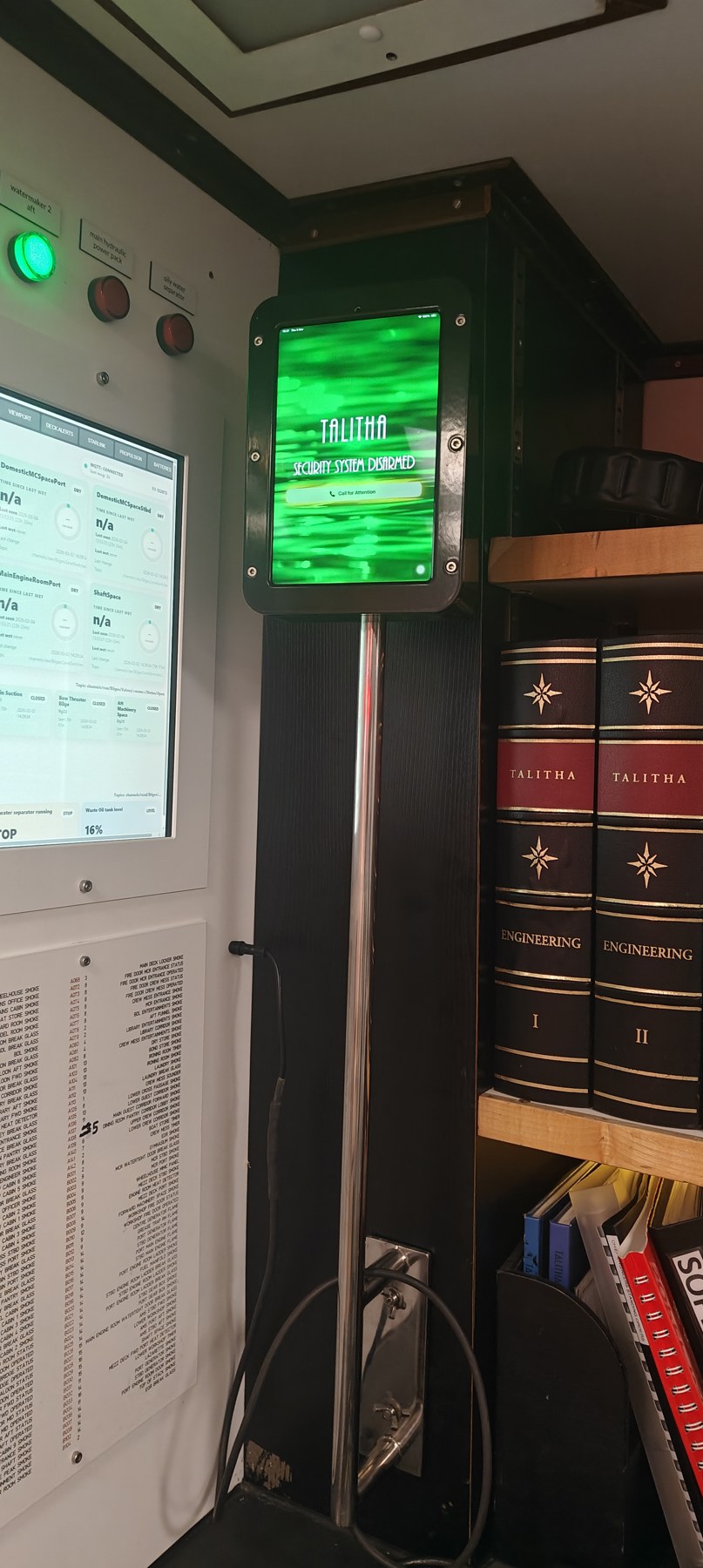
doorbell spot
Chapter 3
Utility Panels
I have written a bunch of utilities like fire head stats etc. I have grouped a lot of them into one web page with selectors at the top
http://192.168.0.93:5000/menu
thats one for the engine room and there is another for public use.
http://192.168.0.93:5000/menu
thats one for the engine room and there is another for public use.
Chapter 4
Peloton
The Peloton in the gym is new so the gym one went outside to the deck. I butchered a power supply and sank it into a box with a pint of epoxy under the floorplate. Its a USB C plug, but there are 2 or three connections before it gets to the screen so i dont hold out much hope for its lifespan. WD40 will help
Chapter 5
Stabilisers
System has been fine all the way across the pond. I have made a few adjustments since install. I added an A-D converter which connects to the feedback sensors on the stabiliser and sends back 0-10v to a rpi here: http://192.168.0.114:5000/
this pi also feeds things like the bridge info panel etc.
I added a PLC to the start function of the stabiliser, so that when start is selected it will alternate pumps if they are in auto. There is a failover also that will start the sleeping pump if the running pump trips. I could enhance that a bit maybe.
If the weather is rough you will get an audio oil level alert, but thats way before the oil needs topping. Its just slop, but if it happens a lot then it will need oil.
I also connected the grease pumps to flow, so that you get an audible alert when they run. The cycle is a minute or two of pumping every 20 minutes or so, which is either annoying on a trip, or comforting, depending on how you look at it.
this pi also feeds things like the bridge info panel etc.
I added a PLC to the start function of the stabiliser, so that when start is selected it will alternate pumps if they are in auto. There is a failover also that will start the sleeping pump if the running pump trips. I could enhance that a bit maybe.
If the weather is rough you will get an audio oil level alert, but thats way before the oil needs topping. Its just slop, but if it happens a lot then it will need oil.
I also connected the grease pumps to flow, so that you get an audible alert when they run. The cycle is a minute or two of pumping every 20 minutes or so, which is either annoying on a trip, or comforting, depending on how you look at it.
Chapter 6
Alert Predictor
I rewrote the alert predictor to be a bit less crap. Its here now http://192.168.0.92:5090/ This one is a bit more choosy and will hopefully not write too much garbage. It takes into account fluctuating readings like fridge compressor cycles affecting cold storage temps etc. I think i'm really the only one who looks at it
Chapter 7
Pi Fleet admin
I've got around 40 raspberry pis doing various things. Its hard to keep track. Also a mac mini doing some heavier lifting.
It became necessary to write an admin script for the fleet which logs into them all and reports issues. They now all sync to the rackstation and backup, as well as sync time. Quite a few of the pi's are pretty vital, like pi55 and pi99. some of them are useful, and some are just silly. But they all get backed up. There are a lot of scripts running on each. the fleet management tool is http://192.168.0.92:5055 but i would avoid using it as it is pretty invasive and can cause damage if you're not sure what to do
It became necessary to write an admin script for the fleet which logs into them all and reports issues. They now all sync to the rackstation and backup, as well as sync time. Quite a few of the pi's are pretty vital, like pi55 and pi99. some of them are useful, and some are just silly. But they all get backed up. There are a lot of scripts running on each. the fleet management tool is http://192.168.0.92:5055 but i would avoid using it as it is pretty invasive and can cause damage if you're not sure what to do
Chapter 8
Pager
The pager receiver in the funnel has been playing up. It can disconnect from the network, which means although it should still get navigation alarms it won't get security alarms.
To fix this i have set up a watchdog function that periodically checks the connectivity and will alert via the syslog. That means Hazel will tell you to reset the breaker in the emergency generator room.
I have added similar watchdog features to quite a few things.
I have also added code that sends a pager alert when arming the security system at 10pm. so thats a good test
To fix this i have set up a watchdog function that periodically checks the connectivity and will alert via the syslog. That means Hazel will tell you to reset the breaker in the emergency generator room.
I have added similar watchdog features to quite a few things.
I have also added code that sends a pager alert when arming the security system at 10pm. so thats a good test
Chapter 9
Room Temps
Each room now has a shelly temperature / humidity sensor. These are battery powered with 2 x AA and use mqtt to talk to a central rpi server http://192.168.0.113:8102/ with various layouts. Personally i like the small tile page.
Batterys should last months as they only update when the temp changes by 0.5 degs or after 7200 seconds. If a zone hasnt updated in that time it will flash red, but usually that just means nothing has changed and its a little slow. If you find red flashing goes on longer than say 10000 secs then there could be a wifi access point out. In which case check the AP page http://192.168.0.93:8080/ where the lower half details wifi points. all should be green.
I am currently thinking about adding Hazel code to announce low batteries or high humidity.
The tiles are colour coded to change colour with temp, which is why the MCR is currently orange as its 30.1 degrees.
Batterys should last months as they only update when the temp changes by 0.5 degs or after 7200 seconds. If a zone hasnt updated in that time it will flash red, but usually that just means nothing has changed and its a little slow. If you find red flashing goes on longer than say 10000 secs then there could be a wifi access point out. In which case check the AP page http://192.168.0.93:8080/ where the lower half details wifi points. all should be green.
I am currently thinking about adding Hazel code to announce low batteries or high humidity.
The tiles are colour coded to change colour with temp, which is why the MCR is currently orange as its 30.1 degrees.
Chapter 10
Kodi / Jellyfin
Kodi is starting to show its age, although its pretty sweet it relies largely on raspbery pis which can be subject to crashes after power cuts due to micro sd card corruption. Also each kodi pi or (librelec) takes an age to set up as theres much configuration. Plus each needs to download metadata for all the movies we have and all the TV shows which is a lot of data.
For this reason I've started to trial Jellyfin, which is a server based system. It downloadsall the metadata and just farms out streams to whoever wants to use it.
The drawback is we need a server, but the advantage is it runs on anything, like most smart TVs, fire sticks, latops, phones and even browsers.
For the guest cabins that means we can scrap the huawei tablets which suck. I have given Hannah a QR code which she distributes to the guests and they simply take a photo and login with an ipad or whatever without even downloading an app. No password. Its pretty slick.
Downside is it needs a server and the only machine we have thats pokey enough is my mac in the MCR.
Assuming the trial works out I'll get something tasty to run it later in the year. But for now you just use the QR code, or the ip address which is http://192.168.0.133:8096
Because its my mac I have locked it off and set it to boot into the desktop automatically in case in reboots for some reason.
There are still Kodi pi's dotted about, because some folk prefer them, and because they are already set up in the guest areas etc. But a lot of the crew kodi pi's are being repurposed as they are mostly pi3's which arent really up to it.
For this reason I've started to trial Jellyfin, which is a server based system. It downloadsall the metadata and just farms out streams to whoever wants to use it.
The drawback is we need a server, but the advantage is it runs on anything, like most smart TVs, fire sticks, latops, phones and even browsers.
For the guest cabins that means we can scrap the huawei tablets which suck. I have given Hannah a QR code which she distributes to the guests and they simply take a photo and login with an ipad or whatever without even downloading an app. No password. Its pretty slick.
Downside is it needs a server and the only machine we have thats pokey enough is my mac in the MCR.
Assuming the trial works out I'll get something tasty to run it later in the year. But for now you just use the QR code, or the ip address which is http://192.168.0.133:8096
Because its my mac I have locked it off and set it to boot into the desktop automatically in case in reboots for some reason.
There are still Kodi pi's dotted about, because some folk prefer them, and because they are already set up in the guest areas etc. But a lot of the crew kodi pi's are being repurposed as they are mostly pi3's which arent really up to it.
Chapter 11
Radar
Radar died a few days before the crossing so a rush job fitting a new antenna up the funnel. So its the upper unit - stbd side radar. Replaces the one I fitted in 2017. In house job with KH on the phone. Very stressful but all good. Some glitches in that they could only configure up to a point and the rest I did myself.
The reason is that each KH unit, be it ecdis or radar or both, requires NMEA feeds from several sources; depth, wind, gyro, gps, rudder, log, compass, etc etc.
When you buy one KH unit they give you one interface for the job, which only does 6 NMEA feeds, which isn't enough.
They then say you can buy another interface if you want, which is about 2500 bucks. This is vexing as they are all network UDP devices. To give you an example, I have several moxa udp serial nextwork devices which do exactly the same job dotted about the ship for various reasons. The way networks work is that if you want to send data from one udp device to every single ip address on the network you can. Thats kind of the point.
So in fact two of these KH serial devices, with 6 ports each means we could in theory send 12 NMEA data streams to the whole network and anyone on it who cares to listen. In practice the KH system is a totally separate network which it has to be, but its still a network, so all the KH units could be served by 2 serial devices. But they want you to have 6, and physically double up every NMEA feed.
We didnt have 6, and we didnt feel like buying more. Theres one for each KH unit. So we are limited to 6 identical NMEA feeds coming out of three identical serial devices. This is bullshit.
KH man was a little confused when he logged in, as I had simply changed the port number on the udp interface so that both the ecdis and starboard radar could hear the data streams from two of the serial interfaces. In practice thats 10 feeds to each unit. This is how networks work. I am sure they would prefer we bought 3 more interfaces but using them like straight feeds is simply insane so fuck that noise.
Anyway, when we had finished the radar setup he also set up the ecdis to read the first serial interface, but he ignored the second. So he knows that one interface is being shared, presumably a little unkosherly, but didnt seem to object. I then had to hack in to re-enable the second interface.
All this waffle is to say that stbd radar and ecdis share 2 interfaces now, with 10 feeds. Port radar still has a solo connection to one interface and 6 feeds. There is supposed to be a connection between all of them, but i didnt want to hack the switch as thats getting into the weeds where I shouldnt go. But they will come and do it in May hopefully.
Its worth mentioning that we tried to get track control working from the ecdis to the autopilot, but they got very tight lipped about it. I'm starting to think no one knows what they are doing in this arena. Certainly Electromed were a huge letdown, with a curt 'you're on your own' message the day before we sailed.
In the process of monitoring the feed I managed to suss why the port wasnt reading, and i enabled it and connected a moxa to test view data. A nice side effect of which is that we get route data to the LAN via a nonreturn path and I am parsing that with a pi to show destination and ETA on the crew mess viewport at 192.168.0.203:8088 and also a routemap at 192.168.0.92:8090/map
The reason is that each KH unit, be it ecdis or radar or both, requires NMEA feeds from several sources; depth, wind, gyro, gps, rudder, log, compass, etc etc.
When you buy one KH unit they give you one interface for the job, which only does 6 NMEA feeds, which isn't enough.
They then say you can buy another interface if you want, which is about 2500 bucks. This is vexing as they are all network UDP devices. To give you an example, I have several moxa udp serial nextwork devices which do exactly the same job dotted about the ship for various reasons. The way networks work is that if you want to send data from one udp device to every single ip address on the network you can. Thats kind of the point.
So in fact two of these KH serial devices, with 6 ports each means we could in theory send 12 NMEA data streams to the whole network and anyone on it who cares to listen. In practice the KH system is a totally separate network which it has to be, but its still a network, so all the KH units could be served by 2 serial devices. But they want you to have 6, and physically double up every NMEA feed.
We didnt have 6, and we didnt feel like buying more. Theres one for each KH unit. So we are limited to 6 identical NMEA feeds coming out of three identical serial devices. This is bullshit.
KH man was a little confused when he logged in, as I had simply changed the port number on the udp interface so that both the ecdis and starboard radar could hear the data streams from two of the serial interfaces. In practice thats 10 feeds to each unit. This is how networks work. I am sure they would prefer we bought 3 more interfaces but using them like straight feeds is simply insane so fuck that noise.
Anyway, when we had finished the radar setup he also set up the ecdis to read the first serial interface, but he ignored the second. So he knows that one interface is being shared, presumably a little unkosherly, but didnt seem to object. I then had to hack in to re-enable the second interface.
All this waffle is to say that stbd radar and ecdis share 2 interfaces now, with 10 feeds. Port radar still has a solo connection to one interface and 6 feeds. There is supposed to be a connection between all of them, but i didnt want to hack the switch as thats getting into the weeds where I shouldnt go. But they will come and do it in May hopefully.
Its worth mentioning that we tried to get track control working from the ecdis to the autopilot, but they got very tight lipped about it. I'm starting to think no one knows what they are doing in this arena. Certainly Electromed were a huge letdown, with a curt 'you're on your own' message the day before we sailed.
In the process of monitoring the feed I managed to suss why the port wasnt reading, and i enabled it and connected a moxa to test view data. A nice side effect of which is that we get route data to the LAN via a nonreturn path and I am parsing that with a pi to show destination and ETA on the crew mess viewport at 192.168.0.203:8088 and also a routemap at 192.168.0.92:8090/map
Chapter 12
Nav Alarms / Depth Sounder
Theres a new echo sounder to replace the skipper gds101. its a touch screen, but it doesnt have an alarm interface connection.
The only way I could get it to connect to the navalarm traffic/pager thing on the console is by using a rpi to parse the nmea feed from the main nmea moxa.
just fyi the main nmea moxa is a serial to network device that feeds our NMEA data to the network. Its actually fed from a multiplexer which is about 30 years old. This things collects up to 8 nmea feeds and joins them together. The moxa then squirts out the result to whoever wants to read it.
I rigged an AIS test screen, with the raw data on the right, so you can see what its doing. http://192.168.0.92:5092
I've a bunch of scripts that interpret this data so for the depth alarm the pi looks for an alarm message and triggers the navalarm PLC that way. Its clunky but it was the only way to do it. That pi is on 192.168.0.210, and it does a daily reboot at 5am just to refresh.
The only way I could get it to connect to the navalarm traffic/pager thing on the console is by using a rpi to parse the nmea feed from the main nmea moxa.
just fyi the main nmea moxa is a serial to network device that feeds our NMEA data to the network. Its actually fed from a multiplexer which is about 30 years old. This things collects up to 8 nmea feeds and joins them together. The moxa then squirts out the result to whoever wants to read it.
I rigged an AIS test screen, with the raw data on the right, so you can see what its doing. http://192.168.0.92:5092
I've a bunch of scripts that interpret this data so for the depth alarm the pi looks for an alarm message and triggers the navalarm PLC that way. Its clunky but it was the only way to do it. That pi is on 192.168.0.210, and it does a daily reboot at 5am just to refresh.
Chapter 13
GPS - Gyro heading sensor
New one on steel beach. This has 6 feeds, so it can act as gyro like the old one but also feeds the ecdis/stbd radar and transas as D-Gps. or GPS3.
its also network connected as a nice benefit is that it has roll/pitch and heave, which another pi parses for the propulsion display. Its actually this pi, on 192.168.35.123, so if you can't read this you probably cant see the roll/pitch/heave.
its also network connected as a nice benefit is that it has roll/pitch and heave, which another pi parses for the propulsion display. Its actually this pi, on 192.168.35.123, so if you can't read this you probably cant see the roll/pitch/heave.
Chapter 14
Entertainments
Not much to report. Two new speakers in the BDL deckhead aft. Had them rebuilt. Everything else is working apart from the speaker lift thing above the bar, which has finally died, thankfully as it was a bit much to expect it to live forever.
Its worth noting that I have had to relogin to expressVPN on a few of the firecubes. Not all of them are happy to access BBC i notice, but they are getting more strict about blocking vps use. not much to be done about it.
Note that percy has a firecube. Percy TV must me manually switched on/off by running your finger down the left side (if its stowed, or underneath if its horizontal) and then the firecube works as normal.
Firecubes either have Kodi or Jellyfin. Kodi is a bitch to install on a Firecube but its an option.
I have written a movie library app here http://192.168.0.93:5005/combined which actually logs into both Kaleidescape and Kodi to give you a list of what we have movie wise and if its on Kodi or KS or both. The green dots are a snapshot review I was asked to add where possible.
Its worth remembering the BDL uses a sofabaton remote like the crew mess one which changes the HDMI feed to both the matrix input of the picture frame and the HDMI socket on the bar. Sometimes people forget there are 2 remotes.
Crew mess TV was a bitch to sort, as the button on the side stopped working. This was due to the relay continually burning out. Turning off the power to the TV is a very clunky way to control it so in the end I ripped it all out and started again.
The way it works is that the remote control doesnt control the TV, only the other kit. The TV camera view screen is a pi5 that runs the aft mast cam stream and data feeds but also controls the TV. Hence it comes on at 06.30 and shows the camera view. Since it does that its a small extra piece of fuckery to connect the button to the pi 5 to run a script to turn off the port side TV via a network command. This is why it comes on much faster, as its not really all the way off. It also sends a sinal to an ethernet relay which disconnects the port side speakers and turns off the red light in the switch. Having done that its yet another small piece of fuckery to get the sofabaton to send the pi a command to run a script to turn the TVs on and off together as normal. Its altogether much neater, but it relies on the rpi being up and running. ping 192.168.0.203 first if you thing something is wrong.
Its worth noting that I have had to relogin to expressVPN on a few of the firecubes. Not all of them are happy to access BBC i notice, but they are getting more strict about blocking vps use. not much to be done about it.
Note that percy has a firecube. Percy TV must me manually switched on/off by running your finger down the left side (if its stowed, or underneath if its horizontal) and then the firecube works as normal.
Firecubes either have Kodi or Jellyfin. Kodi is a bitch to install on a Firecube but its an option.
I have written a movie library app here http://192.168.0.93:5005/combined which actually logs into both Kaleidescape and Kodi to give you a list of what we have movie wise and if its on Kodi or KS or both. The green dots are a snapshot review I was asked to add where possible.
Its worth remembering the BDL uses a sofabaton remote like the crew mess one which changes the HDMI feed to both the matrix input of the picture frame and the HDMI socket on the bar. Sometimes people forget there are 2 remotes.
Crew mess TV was a bitch to sort, as the button on the side stopped working. This was due to the relay continually burning out. Turning off the power to the TV is a very clunky way to control it so in the end I ripped it all out and started again.
The way it works is that the remote control doesnt control the TV, only the other kit. The TV camera view screen is a pi5 that runs the aft mast cam stream and data feeds but also controls the TV. Hence it comes on at 06.30 and shows the camera view. Since it does that its a small extra piece of fuckery to connect the button to the pi 5 to run a script to turn off the port side TV via a network command. This is why it comes on much faster, as its not really all the way off. It also sends a sinal to an ethernet relay which disconnects the port side speakers and turns off the red light in the switch. Having done that its yet another small piece of fuckery to get the sofabaton to send the pi a command to run a script to turn the TVs on and off together as normal. Its altogether much neater, but it relies on the rpi being up and running. ping 192.168.0.203 first if you thing something is wrong.
Chapter 15
Lighting
Oddly important thing here. There are now two types of golf ball E27 bulbs. (well there are loads actually but two that we are aiming to stick with)
The megaman bulbs are ugly as fuck on deck, and not very nice inside either, though they dim well.
So I have removed them wherever I have seen them, especially on deck where they should never go as its not a dimmable system. There are now 6watt and 4watt versions of dimmable led filament lamps. The 4 watt ones can go on deck, assuming we have no more of the non dimmable 3.5 watt ones. Opaque bulbs are a no no. The 6 watt ones I bought because some areas have only a few lamps, like the saloon. So its on a by case basis.
I also bought a bunch of e14 candle bulbs, also filament, for the crew bathrooms, before i noticed Crabbie had bought a stack of opaque ones. They are also fine for crew bathrooms, though very bright.
I have binned a lot of crap. Mainly the old dichroic halogens have all gone, as well as EFL/CFL fluorescent twirly things.
I also ripped out all the crew cabin deckhead lights and replaced with LED. This required a major rewire as the Germans inflicted a painful enormous system of 0-10v EFL dimming. See photo. I have quite a few spares, and we will do the crew mess and galley next, though i need to make bezels.
I had to fit dimmers in all cabins. There are some left though.
The megaman bulbs are ugly as fuck on deck, and not very nice inside either, though they dim well.
So I have removed them wherever I have seen them, especially on deck where they should never go as its not a dimmable system. There are now 6watt and 4watt versions of dimmable led filament lamps. The 4 watt ones can go on deck, assuming we have no more of the non dimmable 3.5 watt ones. Opaque bulbs are a no no. The 6 watt ones I bought because some areas have only a few lamps, like the saloon. So its on a by case basis.
I also bought a bunch of e14 candle bulbs, also filament, for the crew bathrooms, before i noticed Crabbie had bought a stack of opaque ones. They are also fine for crew bathrooms, though very bright.
I have binned a lot of crap. Mainly the old dichroic halogens have all gone, as well as EFL/CFL fluorescent twirly things.
I also ripped out all the crew cabin deckhead lights and replaced with LED. This required a major rewire as the Germans inflicted a painful enormous system of 0-10v EFL dimming. See photo. I have quite a few spares, and we will do the crew mess and galley next, though i need to make bezels.
I had to fit dimmers in all cabins. There are some left though.
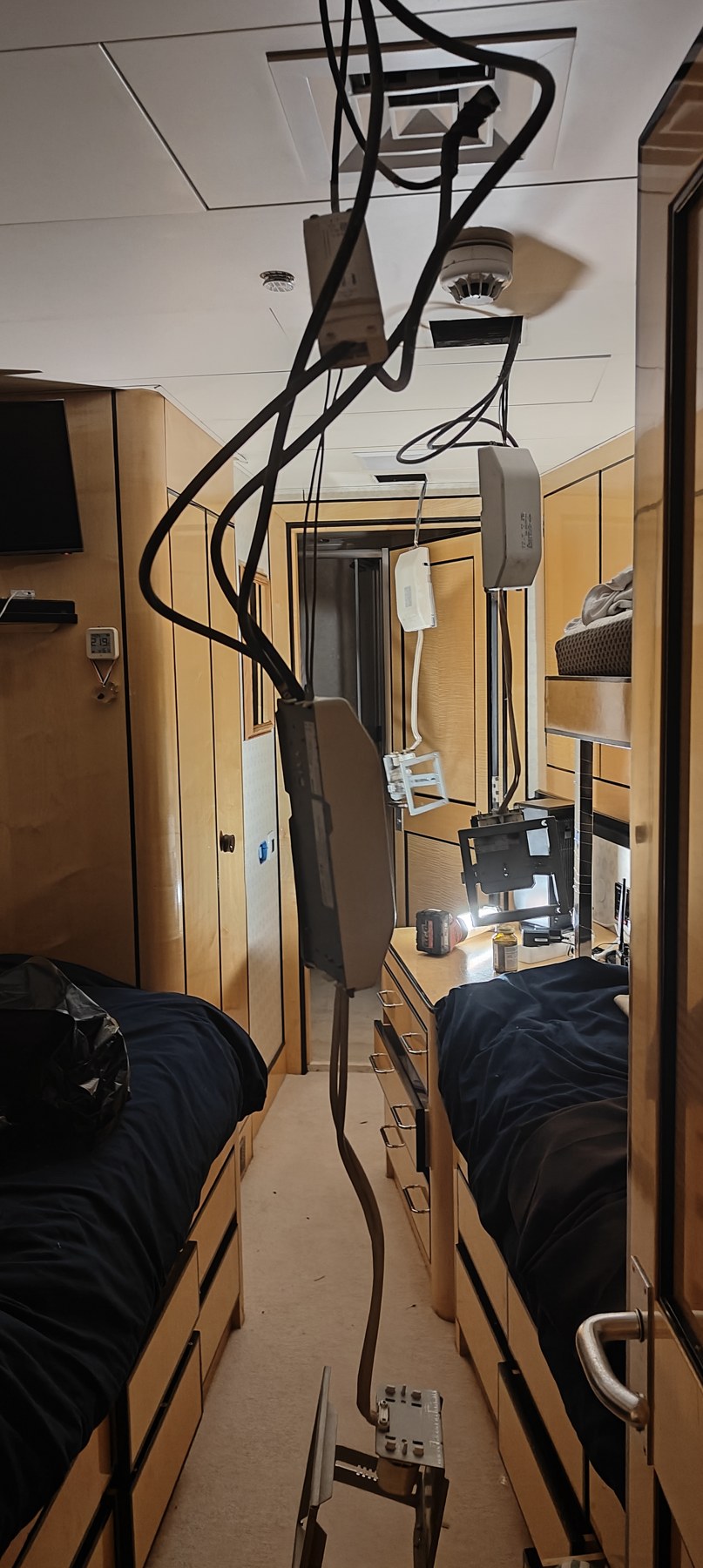
germans
Chapter 16
Batteries
We installed new ships and radio batteries in Barcelona. I used Victron this time as we got a price and they are supposedly the dogs. The overall AH has increased to 500AH each bank. They are AGM batteries which means they don't have electrolyte sloshing about but stacked in absorbent matts between the plates. They are also deep cycle as opposed to crank, which the last ones were (we got them in Antigua so we couldn't be choosy) Theoretically they charge faster, last longer etc. I would probably not look to be changing them again for 4 years minimum.
I also replaced the charge monitoring module, as the battery covers were left off and everything got wet and it blew. There was actually a hole melted in one battery, which i think was a welder!
Anyway I rewrote the script for the battery monitor and its here http://192.168.0.93:5009
I added the UPS's to the script too. All except one which has locked me out. Thats the new bridge one, but as its new i'm not worried about it.
The UPS's are not far from needing a battery swapout. Its extremely hard to tell. Its generally just done on a 4 yearly rotation. As its not certain its better to do them all at once in May or after the summer. Having said that we have a shitload of batteries on board if we need to replace any.
The battery packs are easy to slide out. But i bought individual batteries, not packs, as it saves a fortune and they are identical. You just need to be very careful about connecting all 4 batteries correctly, so if you have to do it, dont just disconnect, make a note of each connection. Then you need to tape the plastic supports after. Its pretty easy. Its worth noting we have 7 Eaton ups's with this type of battery in them. Three are in the MCR, one to my right in the console front, one to my left underneath in back, and one in the PI cupboard behind the green screens. All of them are important. If we lose power to anything fed by a UPS theres a 50/50 chance it will never come back.
There are two more in the server room. One for the kaleidescape and PBX and one for the DHCP server/wanmeister router/cisco router. Then there are two in the bridge, for the port radar and ecdis/ transas and the wheelhouse gateway cisco.
The ups in the office has new baytteries, as does Guys.
I also replaced the charge monitoring module, as the battery covers were left off and everything got wet and it blew. There was actually a hole melted in one battery, which i think was a welder!
Anyway I rewrote the script for the battery monitor and its here http://192.168.0.93:5009
I added the UPS's to the script too. All except one which has locked me out. Thats the new bridge one, but as its new i'm not worried about it.
The UPS's are not far from needing a battery swapout. Its extremely hard to tell. Its generally just done on a 4 yearly rotation. As its not certain its better to do them all at once in May or after the summer. Having said that we have a shitload of batteries on board if we need to replace any.
The battery packs are easy to slide out. But i bought individual batteries, not packs, as it saves a fortune and they are identical. You just need to be very careful about connecting all 4 batteries correctly, so if you have to do it, dont just disconnect, make a note of each connection. Then you need to tape the plastic supports after. Its pretty easy. Its worth noting we have 7 Eaton ups's with this type of battery in them. Three are in the MCR, one to my right in the console front, one to my left underneath in back, and one in the PI cupboard behind the green screens. All of them are important. If we lose power to anything fed by a UPS theres a 50/50 chance it will never come back.
There are two more in the server room. One for the kaleidescape and PBX and one for the DHCP server/wanmeister router/cisco router. Then there are two in the bridge, for the port radar and ecdis/ transas and the wheelhouse gateway cisco.
The ups in the office has new baytteries, as does Guys.
Chapter 17
AIS
Ais is being a bit shit at picking up targets more than 8nm away.
I swapped antennae in the doghouse mast base, where the connections are for the two VHF antennae up the mast on the spreader but it didnt help.
The AIS will complain if the antenna is bad, but it will tolerate a mediocre one.
I have repowered it obviously but it didnt help either. I pulled out a backup antenna as a get out of jail backup, its above the feeder panels in the MCR. Big long one. The plus on it connects directly to the top of the AIS (the fatter cable). But when i tested it results were inconclusive.
Support seemed to suggest its time for a new one.. but I cant remember when I installed it. Not that long ago. 10 years?
I swapped antennae in the doghouse mast base, where the connections are for the two VHF antennae up the mast on the spreader but it didnt help.
The AIS will complain if the antenna is bad, but it will tolerate a mediocre one.
I have repowered it obviously but it didnt help either. I pulled out a backup antenna as a get out of jail backup, its above the feeder panels in the MCR. Big long one. The plus on it connects directly to the top of the AIS (the fatter cable). But when i tested it results were inconclusive.
Support seemed to suggest its time for a new one.. but I cant remember when I installed it. Not that long ago. 10 years?
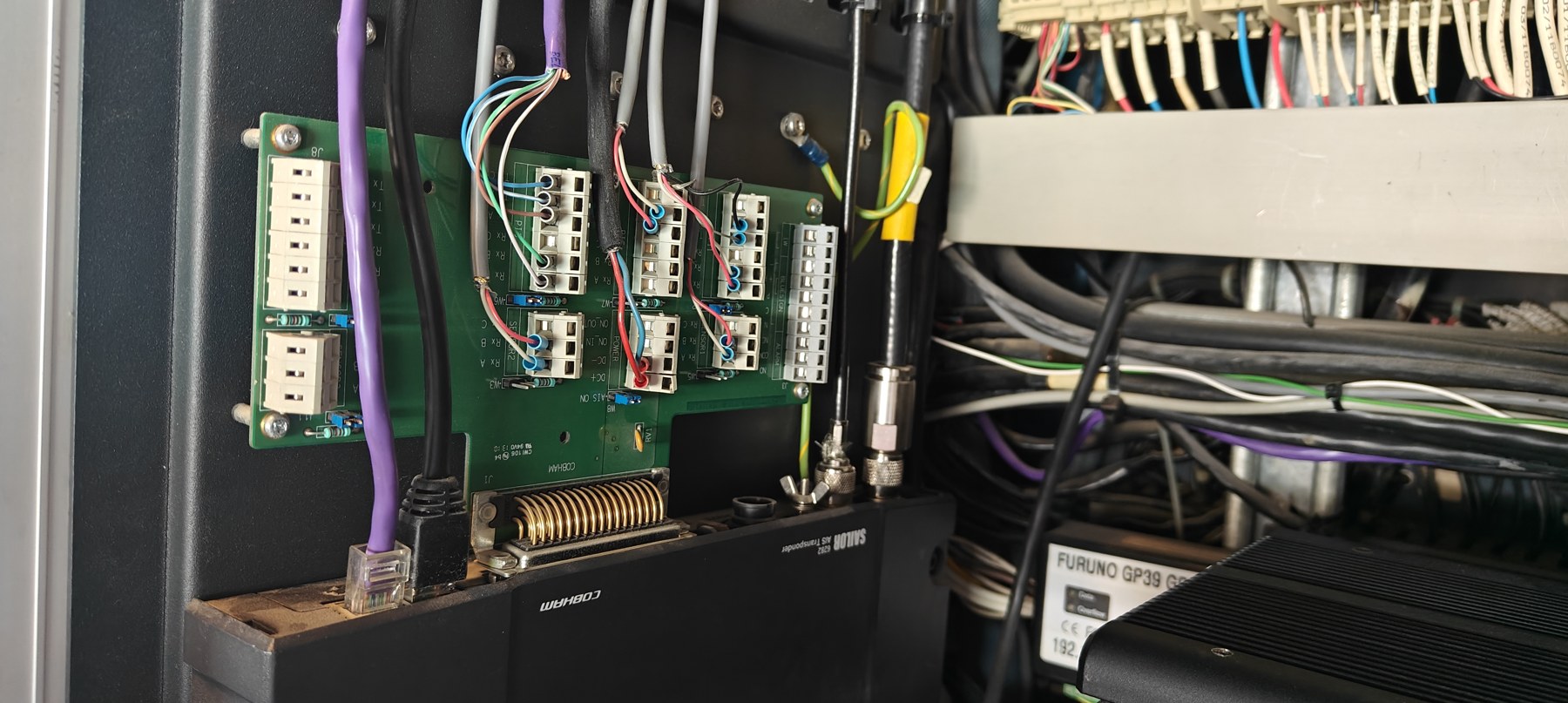
Far right
Chapter 18
Flow
Starting to get paranoid about Flow. Its an old machine and theres no backup server like there is for the security server, and that doesnt really work. There is another machine in the FMS though, but that doesnt help as the config is different.
If we lose the running config we are proper fucked. So I've started doing automated backups. When we do a deploy the config.json file is updated. So that needs to be backed up.
So as I'm paranoid I have done a full flow server backup to the rackstation on the dump folder. I have also done a complete disk clone of the server to an SSD which is in my drawer. I have also set up a nightly copy of the config.json file which keeps copies of every day for 30 days on the rackstation on the cloud backed up PI_Backup directory which itself backs up to google drive.
Problem is we need to know how the bastard is set up. Thanks to chatgpt I have run a diagnostic script that captures all the setup data and writes an instruction list, which is also backed up on the rackstation. The idea being if it literally goes over the side i can build a new one.
My plan is to get a more pokey machine soon. This one is over 10 years old.
If we lose the running config we are proper fucked. So I've started doing automated backups. When we do a deploy the config.json file is updated. So that needs to be backed up.
So as I'm paranoid I have done a full flow server backup to the rackstation on the dump folder. I have also done a complete disk clone of the server to an SSD which is in my drawer. I have also set up a nightly copy of the config.json file which keeps copies of every day for 30 days on the rackstation on the cloud backed up PI_Backup directory which itself backs up to google drive.
Problem is we need to know how the bastard is set up. Thanks to chatgpt I have run a diagnostic script that captures all the setup data and writes an instruction list, which is also backed up on the rackstation. The idea being if it literally goes over the side i can build a new one.
My plan is to get a more pokey machine soon. This one is over 10 years old.
Chapter 19
CCTV
I think we are up to 32 CCTV cams. The system is about maxxed. Its a bit concerning that we only have one CCTV unvr, but i can no longer tell if i'm paranoid or sensible.
Obviously the sundeck awning pole cam was destroyed so its now got its 4th camera installed there. This one pokes out a bit, but its a different model and is supposed to be more weather proof. I guess we will see. I might get one for the BDL table as its a good size for the stainless bezel.
Another new cam forward stbd main deck. That one seems to be a problem area. So another dome cam there. I also had to rerun the cat5 from that cam to the managed switch which is in the deckhead near the gangway.
I want to put one more in the fordeck cowling in May. All working at the moment
Obviously the sundeck awning pole cam was destroyed so its now got its 4th camera installed there. This one pokes out a bit, but its a different model and is supposed to be more weather proof. I guess we will see. I might get one for the BDL table as its a good size for the stainless bezel.
Another new cam forward stbd main deck. That one seems to be a problem area. So another dome cam there. I also had to rerun the cat5 from that cam to the managed switch which is in the deckhead near the gangway.
I want to put one more in the fordeck cowling in May. All working at the moment
Chapter 20
Network
I ran fiber from the wheelhouse to the server room when we were in Tarragona and that has solved the dropout of the backbone issue which was causing grief. Bitch of a job though.
The cisco switch in the BDL is starting to fail. Its more a PoE thing that a connectivity issue but its not a good sign. We should change it in May maybe.
If PoE stuff starts to drop out around the BDL like cameras and wifi, then thats why.
The cisco switch in the BDL is starting to fail. Its more a PoE thing that a connectivity issue but its not a good sign. We should change it in May maybe.
If PoE stuff starts to drop out around the BDL like cameras and wifi, then thats why.
Chapter 21
Water Heater
The water boiler heater dropped the shore power in Tarragona. This is because the only earth leakage protection we have is shore breaker differential trips. I added diff trips to both boiler breakers in the MCR a while ago, but theres not a lot of difference between them and the shore so its a race as to which trips first. I have cranked the sensitivity and delay as much as possible so hopefully they will trip first but you never know.
The boiler elements are banks of three 3phase elements linked in a certain configuration to give certain KW stages that are brought in one stage at a time. Each boiler has three relays, one per element. I just disconnected the relay that clicks in the bad element. It would be clever if each element had a switch off option. Replacing the element banks is painful but the cap on the boiler top gives you the correct wiring method on a drawing on the underside but you need to be very careful and get the orientation right.
The boiler elements are banks of three 3phase elements linked in a certain configuration to give certain KW stages that are brought in one stage at a time. Each boiler has three relays, one per element. I just disconnected the relay that clicks in the bad element. It would be clever if each element had a switch off option. Replacing the element banks is painful but the cap on the boiler top gives you the correct wiring method on a drawing on the underside but you need to be very careful and get the orientation right.
Chapter 22
Funnel Stuff
So we ripped out the Fleet Broadband and binned it. Then moved the starlink off the middle of ceiling to its own little perch on the starboard side. The Intellian is back above the door but as of yet I havent reconnected. Will do so in May.
Chapter 23
Pool stuff
The starboard side dump valve died so we put in a new one
Chapter 24
Galley Fan
I rewired the galley hood extraction so that they now have a volume knob to control speed as well as on off switch. Its worth noting that i had to reverse rotation in the programminng but they seem happy enough.
Chapter 25
Bilge alert page
I wrote a bilge alert page here http://192.168.0.99:5066
the idea being a more granular way to monitor bilge states. There is no delay or hysteresis so each tile is red when water touches and green when not. It also tracks how long it has been since it was wet. Thus you can get a very good idea of sloshing periods which in turn indicates what is in the bilge better when moving. Flow obviously has bilge alarms but you dont want to be alarmed every time a sensor gets slopped on, so there is a timer which means you only get an alarm if its been wet for x amount of seconds. This bilge page will have alerted you in the mcr long before that. Hazel will also nag you about it every minute or so. The historical timer also gives you a very nice indication of what has been happening. For example right now all bilges have been dry since before the crossing, except the AMS stbd which last got wet 6 days ago, and the FMS which is sloshing right now.
the idea being a more granular way to monitor bilge states. There is no delay or hysteresis so each tile is red when water touches and green when not. It also tracks how long it has been since it was wet. Thus you can get a very good idea of sloshing periods which in turn indicates what is in the bilge better when moving. Flow obviously has bilge alarms but you dont want to be alarmed every time a sensor gets slopped on, so there is a timer which means you only get an alarm if its been wet for x amount of seconds. This bilge page will have alerted you in the mcr long before that. Hazel will also nag you about it every minute or so. The historical timer also gives you a very nice indication of what has been happening. For example right now all bilges have been dry since before the crossing, except the AMS stbd which last got wet 6 days ago, and the FMS which is sloshing right now.
Chapter 26
PI Fleet addon
Just as a remote viewer (more for me really) I have this http://194.36.88.180:5080/ running on a vps.
This is a list of the rpis and if they are up or down. Can view this from anywhere
This is a list of the rpis and if they are up or down. Can view this from anywhere